
STILLWATER / FIELD GUIDE
HUSH Beginner Guide: Prepare for Your First Raid
Last updated:
Your first HUSH raid starts before you enter Stillwater. Bring gear you can afford to lose, leave room for supplies and choose an exit early so you have a destination when it is time to leave.

Bring affordable equipment, Bandages and Pills, then deploy into Stillwater on Normal. Press M to check your exits before looting: Highway Roadblock is always open, Hospital Helipad requires a Flare, and Smuggler’s Boat requires 2,000 Cash. Crouch with C or Control, search containers with F, stop bleeding before restoring health and leave enough time to reach your chosen exit.
Your Goal in Stillwater
HUSH is a pure PvE extraction game set in the quarantined town of Stillwater. Each raid lasts 20 minutes and supports up to 12 survivors. You can enter with up to three friends.
Prepare your equipment, collect supplies and reach an exit before the clock runs out. Fighting infected is a risk along the way; getting your loot home is the goal. Between raids, manage your stash and build up your hideout before preparing for another run.
For your first raid, aim for a manageable search and a timely trip to an exit. You do not need to fill every inventory slot before leaving.
Prepare Gear You Can Afford to Lose
Check your loadout before opening PLAY:
- Weapons: Check the Primary, Sidearm and Melee slots so you know what you are bringing. Choose equipment you can afford to replace; a costly weapon is a large loss while you are still learning.
- Storage: Check Pockets and any equipped Rig or Backpack separately. Leave usable empty space for loot—scattered free cells may not fit a larger item.
- Medical supplies: Bring Bandages for bleeding and Pills for health recovery. Check where they are stored so you can find them during an emergency.
- Secure storage: Put items you want protected into the Secure Pouch where they fit. The standard pouch has a 2×2 grid with four cells.
Dying costs you unprotected carried gear and loot. Items inside your secure case come home even if you die. Your stash is separate storage used between raids. Insurance can return eligible gear later if nobody took it during the raid; it does not provide the same protection as the secure case. See death losses and secure storage for those details.
Use the quiet loot-run loadout guide when you want to compare specific weapons, storage and protective gear.
Deploy and Choose an Exit Early
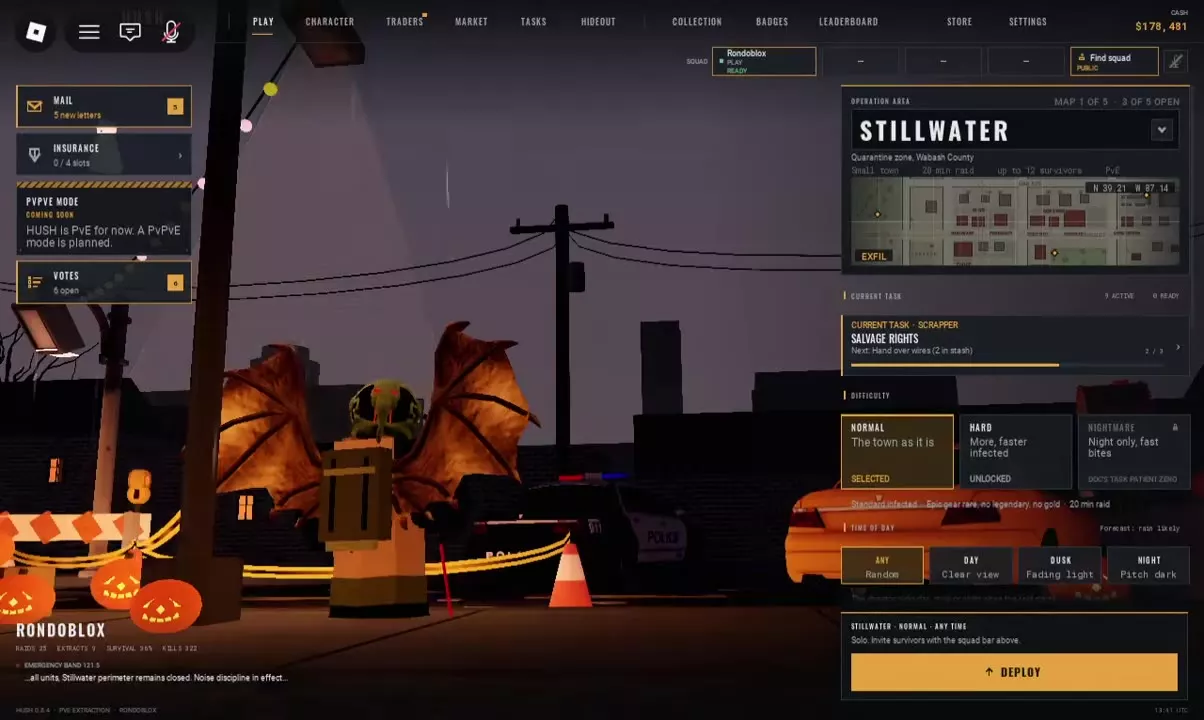
- Open PLAY and select STILLWATER under Operation Area.
- Choose NORMAL. Hard adds more infected and makes them faster, so Normal is the better starting point while you learn the controls and routes.
- Select a time of day: ANY, DAY, DUSK or NIGHT. ANY chooses a random time.
- Click DEPLOY at the bottom right.
- Once inside, press M to open the Town Map and read Marked Exits.
Your three marked exits have different preparation requirements:
- Highway Roadblock: On Route 9 in the west; marked Always open.
- Hospital Helipad: At the Hospital in the southeast; requires lighting a Flare on the pad.
- Smuggler’s Boat: Beside the eastern river; requires a 2,000 Cash payment.
If you have neither a Flare nor the boat payment ready, plan around Highway Roadblock. Click your chosen exit to ping it for your squad, then use its waypoint to guide your movement. Choose with both your position and the exit requirement in mind.
See raid settings for the full difficulty and unlock comparison, or extraction points for more help choosing an exit.
Search, Stay Quiet and Treat Injuries
Search and take what you need
- Use C or Control to crouch while sneaking.
- Approach a searchable container and select its Search action. Nearby doors and furniture can share the interaction list, so check the selected target.
- Press F and let the search finish.
- Look under NEARBY, then drag wanted items into your inventory or use Ctrl-click to move them. Press R while dragging to rotate an item to fit the grid.
- Press Tab to close the inventory and move on.
Searched means you have searched the container; Empty means it has no contents. If you get No space, rearrange the destination grid or make room before trying again. The looting guide covers which containers to check for particular supplies.
Avoid unnecessary fights
Sound attracts infected, and gunshots draw their attention. Watch the noise indicator in the lower-left corner, sneak past enemies where possible and avoid firing simply because an infected is nearby. A melee weapon avoids gunfire, but fighting at close range exposes you to bites.
If infected chase you indoors, close doors behind you and keep moving. Resume searching when you have room to do so instead of staying in a loot menu while enemies close in.
Stop bleeding, then restore health
Bleeding causes continuing health loss. Use a Bandage first and check that the Bleeding indicator disappears. Then right-click Pills in your inventory and select Use to restore health. The inventory also supports double-clicking to use an item.
For replacement medical supplies, check residential Medicine Cabinets and Desks; see healing and supply locations for more detail.
Leave Time to Reach Your Exit
Check the remaining raid time as you search. Stop looting while you still have time to travel, deal with infected and reach the exit whose requirement you can meet. A nearly full backpack is a good reason to head out rather than squeeze in another building.
Open M, confirm your position and mark your destination again if needed. Close the map and follow the waypoint. The Stillwater map guide explains the map symbols and navigation controls.
If you die, return to the lobby and prepare a replacement loadout. To look for replacement gear, open TRADERS → Scrapper → BUY → GEAR. Check an offer’s price, stock and unlock requirements before buying; the Scrapper shop guide covers purchases and locked offers. Recheck your equipment and medical supplies before deploying again.