
STILLWATER / FIELD GUIDE
HUSH Raid Settings: Normal, Hard and Nightmare
Last updated:
Choose your Stillwater raid settings before deploying: difficulty determines the threats you face, while Time of Day sets when you enter the town. Start with a configuration that fits your experience and preparation.

Open PLAY, select Stillwater under OPERATION AREA, choose an unlocked difficulty and a time of day, then click DEPLOY. Normal is the best starting choice for beginners. Hard adds more, faster infected; Nightmare is night-only, features fast bites, and requires completing Doc's Patient Zero task. Stillwater raids last 20 minutes and support up to 12 survivors.
Configure and Deploy a Stillwater Raid
- Open PLAY from the lobby.
- Select STILLWATER under OPERATION AREA.
- Choose an unlocked Difficulty. For your first runs, select NORMAL.
- Choose ANY, DAY, DUSK or NIGHT under TIME OF DAY.
- Click DEPLOY at the bottom right to enter the raid.
Stillwater is a 20-minute PvE raid with up to 12 survivors. Plan to collect supplies and reach an exit before the timer runs out; leave time for the trip to your exit instead of spending the entire raid searching.
The 12-survivor limit applies to the whole raid. Your own squad can contain four players total—you and up to three friends. See squad invites and co-op controls to prepare a group before deploying.
For equipment preparation and what to do after entering town, follow the first-raid guide.
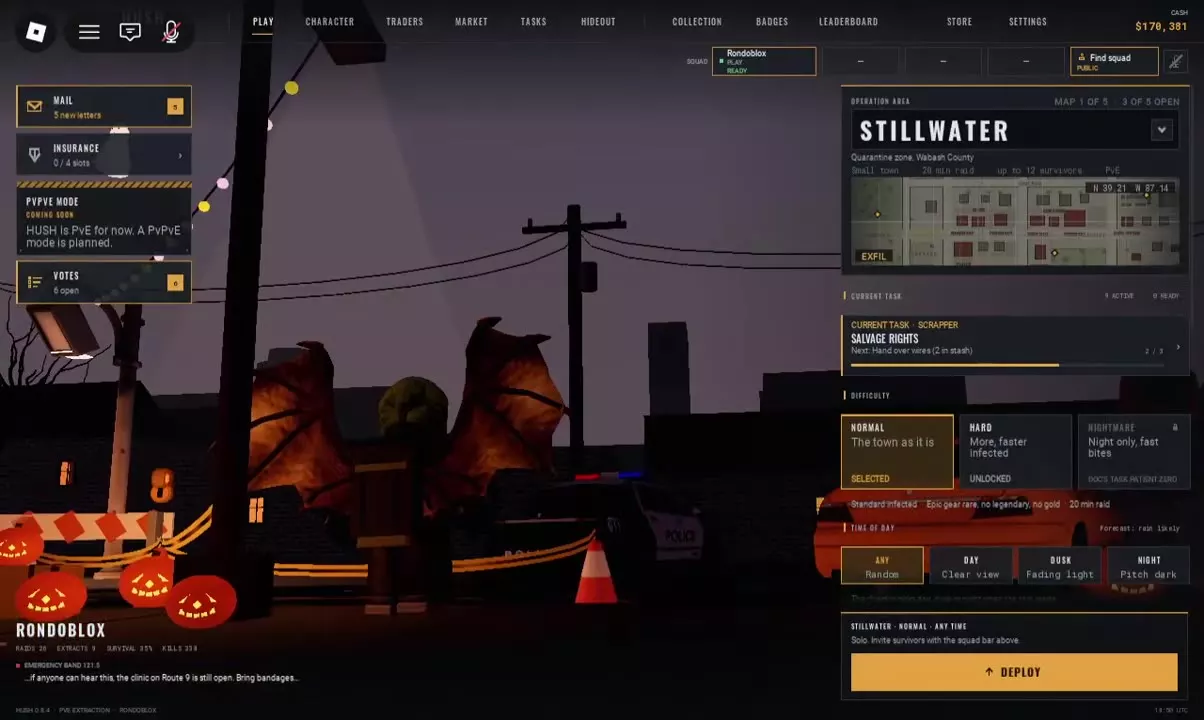
Normal vs Hard vs Nightmare
Start with Normal while learning the town, searching containers and planning exits. Hard's extra infected and higher movement speed make it a less forgiving place to learn those routines. Nightmare adds fast bites and restricts you to nighttime.
Choose according to the challenge you are ready to handle:
- Normal: Recommended for first raids and learning a route before increasing the pressure.
- Hard: Consider it once you can manage encounters and leave enough time to reach an exit. More enemies moving faster give you less room to recover from a poor route choice.
- Nightmare: Choose it when you specifically want nighttime raids with fast bites and have met its task requirement. Give close-range encounters extra caution; see what to do after a bite if you become infected.
-
Normal
-
Hard
- Enemy changes
- More infected; faster infected (Hard deployment description.)
-
Nightmare
- Enemy changes
- Fast bites (Nightmare deployment description.)
- Time restriction
- Night only
- Task requirement
- Doc's PATIENT ZERO (Requirement shown on the locked Nightmare option.)
The Patient Zero Requirement
Complete Doc's Patient Zero task to meet Nightmare's unlock requirement. The locked Nightmare option names this task directly on the deployment screen.
If Nightmare is locked, check your progress on Doc's PATIENT ZERO. Selecting NIGHT in the time-of-day row does not fulfill the task requirement.
Use the task reference for task access, tracking controls and the Patient Zero unlock relationship.
ANY, DAY, DUSK and NIGHT
The TIME OF DAY row lets you choose a specific period or leave it random:
| Setting | Selection |
|---|---|
| ANY | A random time of day |
| DAY | Daytime |
| DUSK | Dusk |
| NIGHT | Nighttime |
Choose ANY when you have no preference, or select a named period when you want that setting for your run. Nightmare's night-only restriction takes precedence: it is not a daytime or dusk option.