
STILLWATER / FIELD GUIDE
HUSH Loot Value Calculator: Sale Quotes, VIP and Value per Slot
Last updated:
Check how much a batch of loot could sell for and how much Cash it earns per inventory cell. Use your item's sale quote, quantity and actual occupied space to compare what is worth carrying.

Enter the sale quote for one item, the quantity and the total cells occupied by that quantity. The calculator multiplies the quote by quantity and divides the proceeds by occupied cells. Apply VIP only to an unboosted quote to add 10%; choose As entered when the quote already includes VIP.
Trader sale proceeds and Cash per occupied cell, with an optional VIP bonus applied to unboosted quotes.
Quoted total = unit sale quote × quantity. Added VIP bonus = quoted total × VIP bonus percentage ÷ 100 when selected. Proceeds = quoted total + added bonus. Value per cell = proceeds ÷ total occupied cells.
- The quote is a sale price for one item, not its purchase price.
- Apply VIP only to a quote that does not already include the bonus.
- Use the actual cells occupied by the entire quantity, including its current stacks.
- All items in one calculation use the same applicable unit quote.
- The calculation does not impose an in-game rounding rule.
Enter the Sale Quote and Actual Occupied Cells
- Enter the Unit sale quote in Cash for one item. Use its selling price, not the price to buy it from a shop.
- Enter the Quantity you plan to sell at that quote. Calculate items with different applicable quotes separately.
- Enter Total occupied cells for the entire quantity in its current arrangement, including stacks. Count the cells the items occupy, not your backpack's capacity or remaining free space.
- Set VIP treatment. Choose As entered for a quote that already includes VIP, or when you are not adding the benefit. Choose Apply VIP to an unboosted quote only when calculating sales with VIP from a price before its bonus.
VIP increases proceeds from everything you sell to every trader. For the pass's other details and purchase comparison, see HUSH game passes.
For help arranging items or checking your storage capacity, use the inventory guide and storage calculator.
Read Total Proceeds and Value per Cell
- Sale proceeds is the estimated Cash for the whole quantity, including any bonus you selected.
- Added VIP bonus is only the extra Cash added by this calculation. A zero here with As entered does not mean your entered quote excludes VIP.
- Value per occupied cell is the proceeds divided by the total space those items occupy. Here, “value per slot” means Cash per grid cell.
To compare loot, run each candidate with its own applicable sale quote and occupied cells. Higher Cash per cell is the better space-efficient choice when both items are being carried solely for sale. Total proceeds still matters when space is plentiful: a larger item can bring more Cash overall while earning less per cell.
The results are arithmetic estimates; the calculator does not apply a separate in-game rounding rule.
Find the Quote and Named Buyer
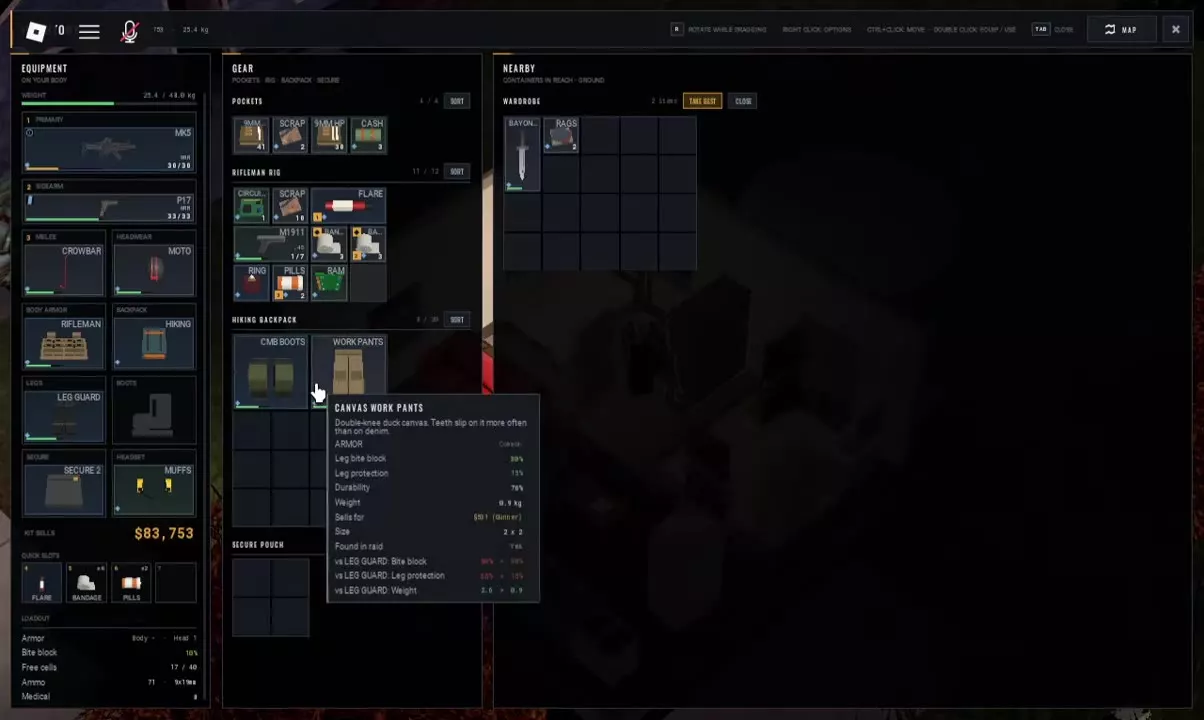
Hover over an item or use Inspect to open its card. Find Sells for and read the trader named beside the amount. In the lobby, open TRADERS to access trader interfaces; Scrapper has a SELL tab alongside BUY.
The Duffel Bag card lists 1,540 Cash to Rook. Its shop purchase price is a separate amount, so use the card's Sells for line for this calculator.
For Canvas Work Pants at 76% durability with Found in raid: Yes, the card lists 301 Cash to Gunner and a stored size of 2 × 2 cells. Using that quote as entered for one pair gives 301 Cash total and 75.25 Cash per cell: 301 ÷ 4. Use your own item's current quote when calculating a different pair.
These card amounts should be entered as displayed. Follow the named buyer on your own item card when planning the sale.
For replacement purchases and shop unlock conditions, see the Scrapper shop guide.
Use Value Alongside Your Raid Needs
Reserve what you need to survive, reach your chosen exit and meet active task requirements before comparing optional loot by sale value. A useful medical item or required exit supply can be worth keeping even when another item offers more Cash per cell.
Check loot sources and practical uses when deciding whether an item has an immediate purpose. Then use value per cell to choose between the remaining sale candidates when space is tight.
Sale proceeds are not net raid profit. Equipment purchases, consumables, insurance and extraction spending can reduce what you earned. Once you have actual income and expenses, enter them in the raid profit calculator to find your net Cash change.